The Relationships Tab provides the ability to search for specific Shops that you want to manage. Once you select a Shop, you can then select to view their UpdatePlus data.
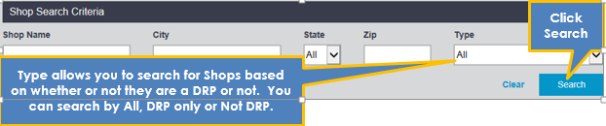
You can either scroll through the list of available Shops or use the search criteria to locate a Shop.
The list of available Shops that meet the criteria display.
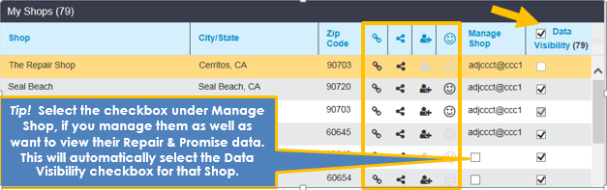
Data Visibility (column heading)
In this column, you can select whether to view that Shop’s repair data if you manage them or not. The Data Visibility column checkbox options are listed below.
| Icon | Description |
|---|---|

|
Available to be selected by you to see their Repair and Promise Data. |

|
Already selected by you to view their Repair & Promise Data. Can be deselected. |

|
Selected by another User and is disabled. This shop is already selected for you by your subordinate. |
If you disable it (uncheck the box under Data Visibility), the Shop will be removed from your list of Shops. It will also automatically be unselected under Manage Shop if you had selected it.
Icon definitions
There are icons used as column headings. You cannot edit these icons. They provide information about the Shop and what UpdatePlus products they use.
| Icon | Description |
|---|---|

|
DRP - The shop has a DRP relationship with the Insurance Company. |

|
Data Sharing - The shop has enabled data sharing with your Company. |

|
The Shop is enabled for CCC UpdatePlus Repair Status. |

|
The Shop is enabled for CCC UpdatePlus CSI. |
